
Enhance Your Social Experience with Customization Tools
Overview
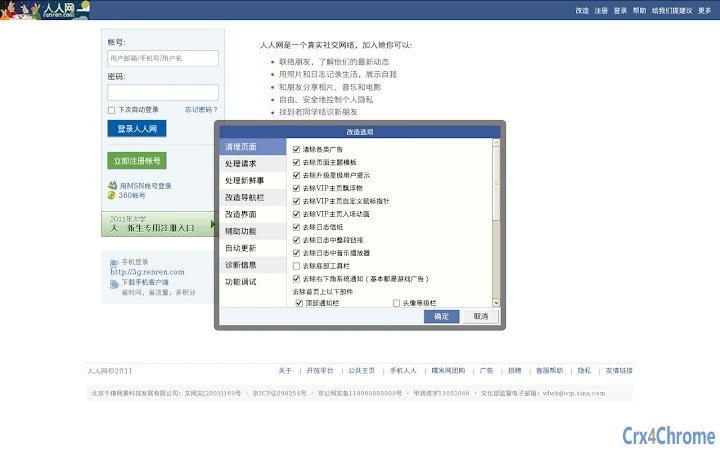
The software is a browser extension designed for Chrome, originally developed as a Greasemonkey script for Firefox. It was adapted to improve the user experience on the social networking platform Renren.com. The primary purpose is to remove unwanted content such as advertisements, redundant widgets, and intrusive notifications. It also restores older visual themes, such as the deep blue interface, which many users found more appealing than modern designs. The tool is particularly useful for individuals who value a clean, personalized browsing environment on a platform that frequently updates its layout and features.
Target users include long-time Renren.com members, tech-savvy individuals, and those seeking greater control over their web interface. It is ideal for users who want to streamline their social media experience by eliminating clutter and customizing navigation. Real-world usage scenarios include managing large photo albums, quickly accessing user profiles, and reducing distractions during daily interactions. The developer did not provide additional background information beyond the project name and hosting platform.
Key Features & Capabilities
- Ad and Widget Removal: Eliminates advertisements and unnecessary components from the homepage and personal profile pages, resulting in a cleaner interface.
- Theme Restoration: Reverts the site’s appearance to the classic deep blue theme, offering a nostalgic and visually consistent layout.
- Automated Notifications Management: Automatically detects and blocks application notifications, reducing interruptions.
- Batch Deletion Tools: Enables users to delete multiple shares, comments, and status updates in a single action.
- Enhanced Image Viewing: Displays full-sized images when hovering over thumbnails, improving browsing efficiency.
- Unified Photo Album Display: Consolidates all photos from an album into one page, simplifying the process of downloading multiple images.
- Permission Bypass: Removes restrictions that prevent non-starred users from changing special friend status or adding nicknames.
- Advanced Search Functionality: Allows users to search for specific content based on keywords within shared posts.
- Expanded Emoji Library: Adds more emoji options to the posting interface for richer expression.
- Customizable Navigation: Users can modify navigation bar items and adjust its width for better usability.
These features collectively support efficient content management, visual customization, and improved workflow. For example, users can quickly download an entire album without navigating through multiple pages, or restore a preferred interface style that has been replaced by newer designs. The tool is especially beneficial for users managing large volumes of content or seeking a more focused experience on a cluttered platform.
User Interface, Workflow & Performance
The interface is integrated directly into the browser environment, operating as a background script that modifies the Renren.com page dynamically. Navigation is handled through browser extension settings, where users can enable or disable specific features. The workflow is designed to be minimal—once installed, most functions operate automatically without requiring user input. For instance, image previews and batch deletion tasks are triggered instantly upon interaction.
Performance details were not specified by the developer. However, based on general behavior of similar browser extensions, the tool likely operates with low overhead. The extension does not appear to require significant CPU or RAM usage during normal operation. Stability is expected to be consistent with standard Greasemonkey-based scripts, though occasional conflicts may arise due to site updates. The developer did not provide information on crash frequency or memory consumption.
Compatibility & System Requirements
The software is compatible with Windows, Mac, and Linux operating systems, supporting both Chrome and Firefox browsers. The current version is 1.0.2, with a file size of 1.5 MB. Installation is straightforward via the browser’s extension manager, though users may encounter issues if their network is restricted. The developer did not specify exact system requirements beyond the supported platforms. It is recommended to ensure that the browser is up to date to avoid compatibility problems.
Compatibility information was partially provided. The extension may not function properly on older browser versions or under restricted network conditions. Users experiencing installation issues are advised to check their network configuration or use alternative access methods, such as proxy servers or downloadable CRX files.
Pros and Cons
Pros
- Restores classic deep blue theme for nostalgic and cleaner interface
- Automatically removes ads and unwanted widgets
- Enables batch deletion of posts, comments, and shares
- Improves photo album management with unified display and quick download
- Supports advanced customization of navigation and user permissions
- Offers keyword-based search for shared content
- Extends emoji options for richer communication
Cons
- May not work under network restrictions or firewalls
- Installation issues may occur without clear error messages
- Updates may not be frequent or well-documented
- Support is limited to email; no public forum or community
- Functionality depends on Renren.com’s current layout and structure
FAQ Section
Q1: Why is a feature not working after installing the extension?
First, confirm whether the issue is caused by the extension by disabling it and refreshing the page. Renren.com frequently updates its interface, which may cause temporary incompatibility. If the problem persists only with the extension enabled, consider contacting the developer via email.
Q2: How can I download photos from an album with proper filenames?
Refer to the official documentation at http://code.google.com/p/xiaonei-reformer/wiki/DownloadAlbum for detailed instructions on naming downloaded files.
Q3: Why does the navigation bar appear in two rows?
This issue can be resolved by reducing the number of navigation items in the settings or by enabling the “Widen Navigation Bar” feature.
Q4: Is the extension safe to use?
The extension is based on open-source scripts and does not collect personal data. However, it operates on a third-party platform, so users should ensure their browser and system are secure.
Q5: Can I use this extension offline?
Yes, once installed, the extension functions without an internet connection. However, it requires an active connection to Renren.com to apply changes to the page.
Final Thoughts
This extension delivers a powerful set of tools for users seeking to reclaim control over their Renren.com experience. It effectively removes clutter, restores preferred visual styles, and streamlines content management. While it relies on external access and may face challenges under restrictive networks, its core functionality remains robust. The tool is best suited for experienced users who value customization and efficiency. For those managing large volumes of content or seeking a cleaner interface, this extension offers a meaningful upgrade. It remains a reliable utility for enhancing user experience on a dynamic platform.
Download xiaonei-reformer now







